
Optimize with recorded shortcuts
Use a real past run to propose a reusable action sequence, inspect it, and verify the next run uses it correctly.
What a shortcut changes
A browser agent normally decides and performs actions as it works through a task. A shortcut packages a proven sequence from a past run so the agent can execute those actions together. The workflow still needs to decide when the shortcut is appropriate and verify the result.
For Explore a guide, the recorded run first opened the documentation site, then selected the exact guide link. Optimize proposed a two-action shortcut with the guide title as a parameter. Reading the headings and deciding what to do when no exact guide exists remained outside that sequence.
Start with a workflow that has a completed or otherwise eligible past run containing useful browser actions. An empty run picker means there is no suitable recorded trajectory available for this workflow yet; first launch and inspect a run.
Select the source run
Open Editor → Optimize. Under Create or improve shortcuts, choose the past run to analyze. Use the displayed time, status, launch source, and browser-action count to identify the intended example.
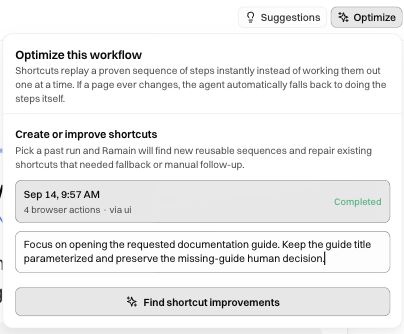
Prefer a run you have already reviewed. A successful label does not guarantee that every detour was worth preserving. You can guide the optimizer with a request such as:
Focus on opening the requested documentation guide. Keep the guide title parameterized and preserve the missing-guide human decision.
Select Find shortcut improvements. Wait for analysis to finish before editing the workflow underneath the proposal. The proposal is based on a particular recorded run and definition; changing the draft during analysis can make it stale.
Review the proposed sequence
Read the explanation, shortcut name, description, action count, and parameters. Open See what it does to inspect the individual actions.
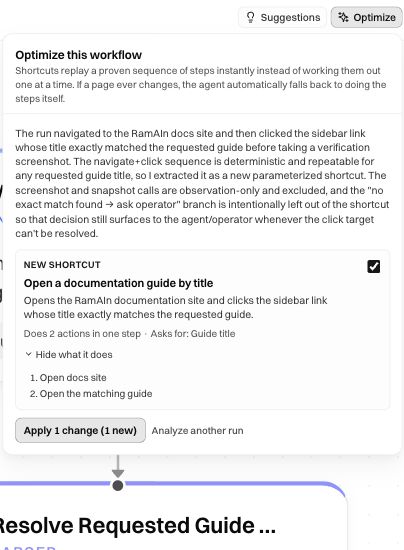
For this example, the review questions are concrete:
- Does the sequence start from the documented site?
- Does the link selection use the supplied guide title?
- Does it preserve an exact match instead of clicking a similar guide?
- Does a missing target return control so the agent can ask the operator?
- Are observation and output steps still performed after navigation?
A shortcut should not absorb an approval, conditional choice, or unreliable guess just because those actions appeared close together in a trace. If several proposals appear, include only the ones that make sense for the task.
Apply the change and confirm it saved
Select the proposal's inclusion checkbox, then Apply … change(s). The accepted shortcut appears under Shortcuts on this workflow and the graph autosaves it. Wait for Saved and the updated version before testing.
Applying a proposal changes future workflow behavior; it does not rewrite the source run. The shortcut is versioned with the definition. Use its removal control if you decide it is unsuitable, and confirm that removal saved as well.
Verify the next run actually used it
Open the source session in History and choose Run with the same data. Inspect the new run's input and final result. Expand its browser-task step to see whether a shortcut was used and which actions it replayed.
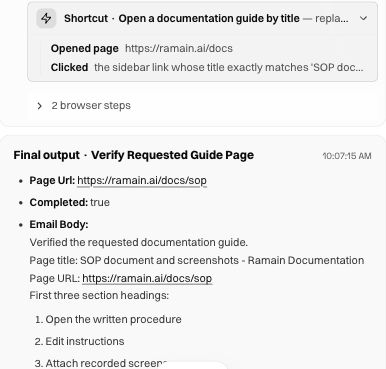
Do not infer shortcut use merely because it is installed. The run log is the evidence that the agent invoked it. Compare correctness first, then duration, retries, and action counts. One faster run is not a reliable benchmark by itself.
Test another valid guide name to check the parameter contract. Also test the missing-guide path so the workflow still asks for clarification. A shortcut that works only for the original sample has not established reusable behavior.
Understand fallback and healing
If a shortcut action fails because the page changed or a target cannot be resolved, the runtime returns the current state so the agent can continue with ordinary tools. Inspect what happened after fallback; the remaining task can still need a human decision or fail.
A later run that used a shortcut can also provide evidence for healing it. Optimize may propose an update to the existing shortcut rather than a second copy. Review the replacement steps and preserved parameters, and verify that the current draft still matches the analysis base before applying it.
If analysis returns no useful proposals
A short run may have too few reusable actions, or its actions may be dominated by decisions and observations that should stay with the agent. No proposal is a valid result. Use a representative run with a repeated sequence and explain the part you want analyzed; do not add meaningless actions just to increase the count.
Use drift and repair for incorrect task behavior. Optimize is most useful when the task is already understood and a repeated action sequence can be executed more efficiently.
Was this page helpful?